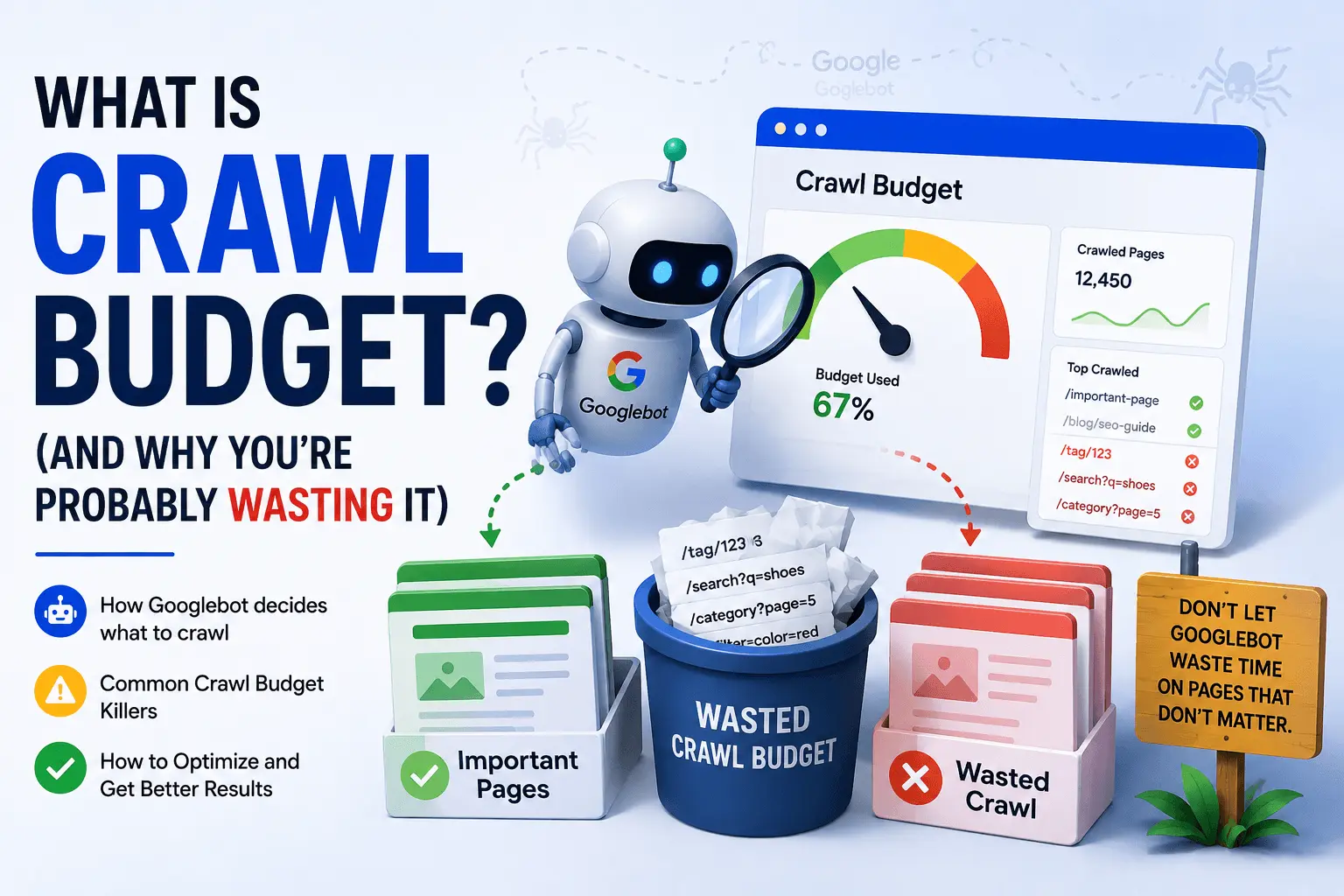
Here's a hard truth about SEO: most of the pages on your website don't rank. Not because they're bad. Because Google never bothers crawling them.
That's crawl budget at work.
If you run a site with more than a few thousand pages, Google isn't crawling everything. It's making choices. Every day, Googlebot decides which pages are worth visiting and which ones can wait. Or get ignored entirely.
That's what crawl budget optimization is about. Making sure Google spends its limited time on your important pages, not your garbage ones.
Let me explain how crawl budget works without the usual jargon.
What Is Crawl Budget
Crawl budget is the number of pages Googlebot is willing and able to crawl on your website within a certain period of time.
Think of it like a restaurant kitchen. Googlebot is the health inspector. It can only visit so many restaurants in a day. When it arrives at yours, it checks what it can in the time available. If your kitchen is clean and organized, it checks everything important and leaves happy. If your kitchen is a mess of duplicate stations and blocked doors, it wastes time and misses things that matter.
That's your website crawl budget at work. Googlebot has limited resources. Your job is to make sure those resources go toward indexing important content, not wasted crawl activity.
Why Crawl Budget Matters
For most small websites, crawl budget isn't something you need to think about.
If you have 50 pages? Google can crawl all of them in one visit. Go worry about something else.
But if you're managing crawl activity on a site with 10,000 pages or more? Crawl budget issues are real. Google won't discover new content quickly. Updated pages might not get recrawled for weeks. Important pages getting indexed becomes a bottleneck.
Here's the friction point: many site owners don't realize they have a crawl budget problem until it's already hurting them. They publish a new blog post and it sits unindexed for a month. They update a product page and search results still show the old description from 2019. Frustrating? Yes. Fixable? Also yes.
E-commerce sites with faceted navigation are the worst offenders. Every filter combination creates a new URL. Which brings us to a real example.
The Crawl Budget Nightmare Scenario
Let me show you exactly how crawl budget gets wasted:
An online store has 500 products.
Each product filters by:
- Color (5 options)
- Size (4 options)
- Price range (3 options)

Every filter combination = new URL
500 products × 5 colors × 4 sizes × 3 price ranges = 30,000 URLs

That's 30,000 crawlable pages.
Google spends its crawl budget on filter URLs
while actual product pages sit uncrawled.
Suddenly 500 products become 30,000 duplicate URLs that Google tries to crawl. Add sorting options? Double it. This is wasted crawl activity eating your budget alive.
How Crawl Budget Works
Search engine crawl behavior follows simple logic. Google wants to index everything important without overwhelming your server. Here's what's happening under the hood.
Crawl Limit
Google sets a crawl limit based on your server. If your site responds quickly, the limit goes up. If your server is slow or throws errors, the limit drops. Server errors are crawl budget poison. Every 5xx error tells Google "back off," and Google listens.
You can see your actual crawl stats in Google Search Console under Settings > Crawl stats. It shows daily crawl activity, downloaded files, and server response times.
Crawl Demand
This is about how much Google wants your pages. Even if your server can handle aggressive crawling, Google won't bother if your content isn't worth it.
Popular pages get crawled more. Fresh content gets priority. URLs with strong internal links get attention. Pages in your xml sitemap receive preference. Backlinks signal importance.
A page nobody visits and nobody links to? Crawl demand is near zero.
Crawl Frequency
The combination of limit and demand determines how often Googlebot visits. Some pages get crawled daily. Some monthly. Some get one visit and never return.
That's crawl prioritization in action. Google assigns its Googlebot resources based on signals you mostly control. The algorithms behind search engine crawl behavior have gotten efficient at recognizing patterns.
What Wastes Your Crawl Budget
Most sites leak crawl budget without realizing it. Here's what's eating yours:
- Faceted navigation URLs creating millions of parameter-based duplicates
- Internal search result pages getting indexed and crawled repeatedly
- Session IDs in URLs generating unique pages per visitor
- Pagination creating endless page variations
- Printer-friendly versions eating crawl activity
- Staging or development pages accidentally exposed to Googlebot
- Redirect chains making Googlebot hop through multiple URLs
- Slow server response times reducing your crawl limit
- Pages blocked in robots.txt that still appear in sitemaps
- Thin content pages with two sentences and a stock photo
Every one of these wastes resources on crawlable pages that don't deserve attention. Meanwhile, your actual content waits in the queue.
How to Optimize Crawl Budget
Here's how to actually fix crawl budget issues:
Clean up your site structure. Remove or noindex low-value pages. If a page doesn't need to rank, don't make Google crawl it. Everything starts with crawl efficiency.
Optimize your robots.txt. Block crawlers from pointless directories. Use a free robots.txt tester to confirm you're not accidentally blocking important pages while allowing garbage. Need to create one? Our robots.txt generator handles it.
Fix your XML sitemap. Your sitemap should only include important pages. If it's cluttered with duplicate URLs or noindexed pages, you're sending mixed signals. Our XML sitemap generator creates clean sitemaps without the junk.
Improve server speed. A faster server means a higher crawl limit. Compress images, use caching, and get decent hosting. This is the fastest way to improve crawl efficiency.
Fix broken links. Every broken internal link triggers a crawl attempt that goes nowhere. Run a scan with a broken link checker and clean them up.
Use canonical tags. When the same content exists at multiple URLs, tell Google which one is the real one. This stops duplicate crawling immediately.
Remove redirect chains. Every redirect hop eats crawl budget. Point redirects directly to the final URL. One hop only.
Check for technical SEO issues. Use a free SEO checker to catch problems you're missing. Crawl errors, slow pages, and indexing issues all waste crawl budget.
Prune thin content. If a blog post has 150 words and zero traffic for two years, delete it or improve it. Don't let it keep burning crawl resources.
Common Crawl Budget Mistakes
You'd be surprised how often these happen:
- Blocking CSS and JavaScript in robots.txt. Google needs these to render pages. Blocking them confuses Googlebot and wastes recrawls.
- Submitting sitemaps with 50,000 URLs when only 2,000 are valuable. Sitemaps should reflect what matters.
- Letting faceted navigation run wild without canonical tags or noindex directives.
- Checking crawl stats obsessively when your site has 30 pages. The crawl budget for a small site is "all of them." Relax.
- Using Disallow instead of noindex to hide pages. Disallow stops crawling but doesn't stop indexing if the page is linked elsewhere.
- Failing to update sitemaps after removing pages, leaving Google chasing 404s.
Most people reading about crawl budget don't need to worry about it. If you have a blog with 50 posts, optimizing crawl budget won't move the needle. Write better content instead.
But if you run a site with thousands of URLs and you're watching important pages sit unindexed, this matters. Stop wasting crawl activity on pages that don't deserve attention.
Clean your sitemap. Fix your broken links. Speed up your server. Check for crawl errors following our guide to fixing crawl errors. Review your robots.txt. Then move on.
The rest of your SEO problems are bigger than crawl budget. Trust me.