You've heard you need one.
An xml sitemap. SEO people talk about them like air. Can't live without one.
But can you?
Let's be honest. If your site is tiny—like under 50 pages, everything linked from your homepage—Google's probably fine. It'll crawl around, find stuff. A sitemap isn't magic.
But if your site is bigger? Or new? Or a mess? Yeah, you should make one.
Here's what it actually is. No hype.
The Simple Definition
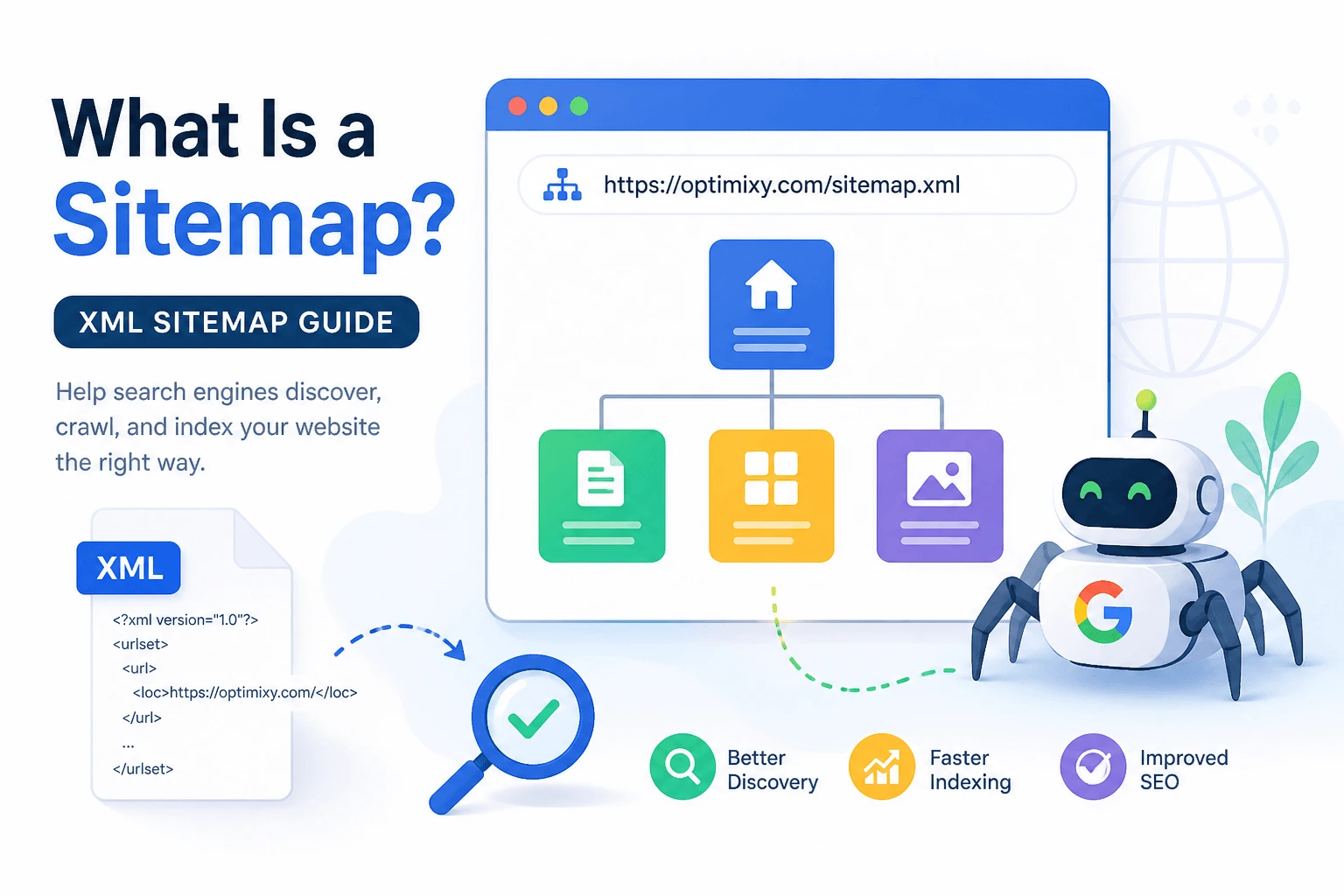
An XML sitemap is a text file. It lists URLs on your site. That's it. No secret sauce.
You put it on your server. You tell Google where it is. Google reads it and says "oh, those pages exist."
It doesn't guarantee ranking. Doesn't fix bad writing. Just says "hey, these pages are here."
Think of it like handing someone a grocery list. They still have to go find the milk. But at least they know milk is on the list.
What's Actually Inside?
Open a sitemap file. You'll see code-like tags. Don't panic.
Basic structure:
<url>
<loc>https://yoursite.com/coffee-maker-review</loc>
<lastmod>2025-04-01</lastmod>
<priority>0.8</priority>
</url>
That's one entry. You can have up to 50,000 of these in one file. Or 50MB. Whichever comes first.
- loc = the URL. Required.
- lastmod = when you last changed it. Optional. Google might use it.
- priority = 0.0 to 1.0. Google mostly ignores this. Don't stress.
You can also add changefreq but again, Google kind of does its own thing.
The Friction Point Nobody Warns You About
Here's where people get stuck.
You generate the sitemap. Cool. Then what?
Uploading it. That's the friction point.
Most guides say "upload to your root folder." Like everyone knows what that means. You don't. And it's fine. I didn't either at first.
Root folder = the main directory where your homepage file lives. Usually public_html, www, or htdocs. You get there through an FTP program (FileZilla is free) or your hosting control panel's file manager.
You drag the sitemap.xml file there. That's it.
But if you've never done it? You'll spend twenty minutes clicking around. Maybe you'll ask a friend. Maybe you'll give up. That's the friction. Real. Annoying.
Some hosts block file access unless you pay more. That's another friction point. If yours does? Switch hosts or use a plugin.
You can generate your sitemap for free using the XML Sitemap Generator. No signup. No email. Just your domain. Then you still have to upload it. Sorry. No way around that part.
Who Actually Needs a Sitemap?
Not everyone. Here's a list. Because lists are easier.
Make one if:
- Your site has over 100 pages
- You just launched (Google doesn't know you exist yet)
- Your internal links are a disaster
- You add new content weekly and want it found faster
- You have pages with no links pointing to them (orphan pages)
Skip it if:
- Your site is under 50 pages
- Every page is linked from your homepage or menu
- Google already crawls you daily
- You don't care if some pages take longer to get indexed
See? Not mandatory for everyone.
How to Generate One (Without Losing Your Mind)
Three ways. Pick your fighter.
Option 1: Plugin or built-in
WordPress? Use Yoast, RankMath, or AIOSEO. Turn on sitemap. Done. It updates automatically when you publish.
Shopify generates one for you. /sitemap.xml at your domain. Already there.
Wix? Same thing.
Option 2: Free online tool
Type your domain. Click go. Download the file.
One that works without signup nonsense: XML Sitemap Generator. You put in your URL, it crawls, you get a file. No email required. I hate tools that ask for email. This one doesn't.
Option 3: Scream into the void and build it manually
Only if you're a control freak or hate yourself. Not recommended.
Submitting to Google (The Actual Steps)
You made the file. You uploaded it. Now what?
- Go to Google Search Console
- Pick your property (your website)
- Click "Sitemaps" in the left menu, under "Indexing"
- Type sitemap.xml into the box
- Hit submit
That's it. Google will check it. You'll see a status. Sometimes it says "success" right away. Sometimes it takes a day.
If it says "couldn't fetch"? You put the file in the wrong place. Go fix it.
Rules That Actually Matter (Short List)
- Keep it under 50,000 URLs. More than that? Split into multiple files: sitemap1.xml, sitemap2.xml, then make a master sitemap-index.xml that lists them all.
- Update it when you add important pages. Not every typo fix. Monthly is fine for most sites.
- Gzip it if you want. Add .gz to the filename. Helps with speed on big files. Not required.
- Put it in your robots.txt file. Add Sitemap: https://yoursite.com/sitemap.xml at the bottom. Helps crawlers find it.
- Don't list pages blocked by robots.txt. That's confusing. Google hits a wall and thinks you're weird.
What Goes Wrong (And Will Go Wrong)
I'll break the fourth wall here: I've submitted maybe a hundred sitemaps in my life. At least a third had some issue.
Most common mess-ups:
- You forget to upload the file. You think you did. You didn't.
- You upload it to the wrong folder. It's sitting in /files/sitemap.xml instead of /sitemap.xml
- You block Google with your .htaccess file without realizing it
- Your pages have noindex tags. Sitemap says "please index." Page says "no." Page wins every time.
- You spelled the filename wrong. sitemap.xlm instead of .xml. Yes, I've done this.
One time I spent three hours debugging a sitemap. Google kept saying 0 pages read. Turned out my client had password-protected the entire staging site and pushed it live by accident. The sitemap was fine. Nobody could see anything.
So check the obvious stuff first. Always.
What About HTML Sitemaps? (For People)
You might have heard of HTML sitemaps. Different thing.
XML sitemap = for search engines. Lives in the background.
HTML sitemap = for humans. A page on your site that lists all your other pages. Like a table of contents.
Some people make both. You don't have to. HTML sitemaps are mostly old school. Nice to have. Not required.
Focus on the XML one. That's what Google actually reads.
How Often Should You Update Your Sitemap?
Depends on your site.
Blog that posts daily? Update daily or weekly.
Small business site that changes once a month? Update monthly.
Brochure site that never changes? Update once. Leave it alone.
Don't overthink this. A slightly old sitemap is better than no sitemap.
The real problem is when you add ten new pages and forget to update the sitemap for three months. Then Google doesn't know they exist. That's on you.
Do You Need a Sitemap Index?
Only if you have more than 50,000 URLs.
A sitemap index is just a file that lists your other sitemap files. Like a menu of menus.
Example structure:
sitemap-index.xml
  - sitemap1.xml (pages 1-50000)
  - sitemap2.xml (pages 50001-100000)
  - sitemap3.xml (images or news)
Most people never need this. If you're asking if you need it, you probably don't.
The Messy Truth About Sitemaps
Here's what nobody admits.
A sitemap won't save bad content.
You can submit a perfect sitemap. Every page listed. Priority set. Lastmod dates fresh.
Google will still ignore half your pages if they're thin, duplicate, or useless.
The sitemap is a helper. Not a savior.
Real friction point
The friction is accepting that. You want a technical fix. A switch to flip. A file to upload that makes everything better.
Doesn't work that way.
The sitemap just opens the door. Your content has to walk through it.
What About Video and Image Sitemaps?
Yeah, those exist too.
Video sitemap = lists video files with title, description, thumbnail.
Image sitemap = lists images on your site.
Most people don't need separate ones. Google finds images and videos through your regular pages anyway.
Only bother if you have a video site (like a course platform) or a huge image library (like a stock photo site).
For everyone else? Regular XML sitemap is fine.
Can You Have Multiple Sitemaps?
Yes. In fact, for big sites, you should.
Different types:
- Main sitemap (regular pages)
- Video sitemap
- Image sitemap
- News sitemap (if you're a news site)
List them all in your robots.txt file. One per line.
Example:
Sitemap: https://yoursite.com/sitemap.xml
Sitemap: https://yoursite.com/sitemap-video.xml
Sitemap: https://yoursite.com/sitemap-news.xml
Google will find them.
A Quick Note About Yoast and RankMath
If you use WordPress, these plugins generate sitemaps automatically.
Yoast puts it at /sitemap_index.xml
RankMath puts it at /sitemap_index.xml
You don't need to do anything. Just check that it exists. Then submit that URL to Google Search Console.
But sometimes these plugins break. Conflicting plugins. Bad updates. Server issues.
Check every few months. Make sure the sitemap still loads. You'd be surprised how often they just… stop working.
One More Friction Point (Because There's Always Another)
Your sitemap might be fine. Google reads it. Shows "success."
But your new pages still don't show up in search.
Why?
Crawl budget.
Google only crawls so many pages on your site per day. If you have thousands of pages, it might take weeks to get through them all. The sitemap helps prioritize. But it doesn't magically make Google crawl faster.
Big sites need patience. And better internal linking. And faster servers. And fewer low-value pages.
The sitemap is one piece. Not the whole puzzle.
When to Give Up on a Sitemap
Honestly? If you've submitted it, waited a month, and Google still hasn't indexed your important pages?
The sitemap isn't the problem.
Check:
- Is your content actually good? (Be honest.)
- Do you have backlinks? (Google ignores sites with zero authority.)
- Is your site slower than a snail? (Fix performance.)
- Did you accidentally block Google in robots.txt? (Happens more than you think.)
Fix those first. Then worry about the sitemap again.
The Short Version (For People Who Skipped Here)
Fine. Here's the bare minimum:
- Make an XML sitemap using a free tool like the XML Sitemap Generator
- Upload it to your server's root folder
- Submit it in Google Search Console
- Update it when you add important pages
- Don't obsess
That's it.
What Actually Happens Next
You'll make your sitemap. You'll submit it. Google will read it.
Some pages will get indexed. Some won't.
You'll check back in a week. You'll see progress. Or you won't.
If you don't? Don't blame the sitemap. Look at your content. Look at your backlinks. Look at your site speed.
The sitemap just points the way. Your site has to be worth visiting.
Last Thing
You probably opened this article hoping for a secret trick.
There isn't one.
Sitemaps are boring. They work or they don't. They help, but they don't fix everything.
Generate your sitemap. Upload it. Submit it.
Then forget about it for a month.
Go write something useful instead. That's what actually moves the needle.
Now close this tab and do the work. Or don't. Your site, your problem.