I remember when adding structured data meant sprinkling arcane tags throughout your HTML like you were seasoning a steak. It was tedious. Every time you updated a page, you had to check whether you broke the schema. Sometimes you did.
Then JSON-LD came along and made the whole thing simpler. Most people switched. Some didn't.
So now we have this situation where two formats exist, both technically work, and beginners get confused about which one to use. For nearly all modern websites, the answer is JSON-LD. The exceptions are where things get interesting.
What Is JSON-LD Schema
JSON-LD stands for JavaScript Object Notation for Linked Data. I've typed that maybe three hundred times and I still have to look it up to make sure I got the acronym right.
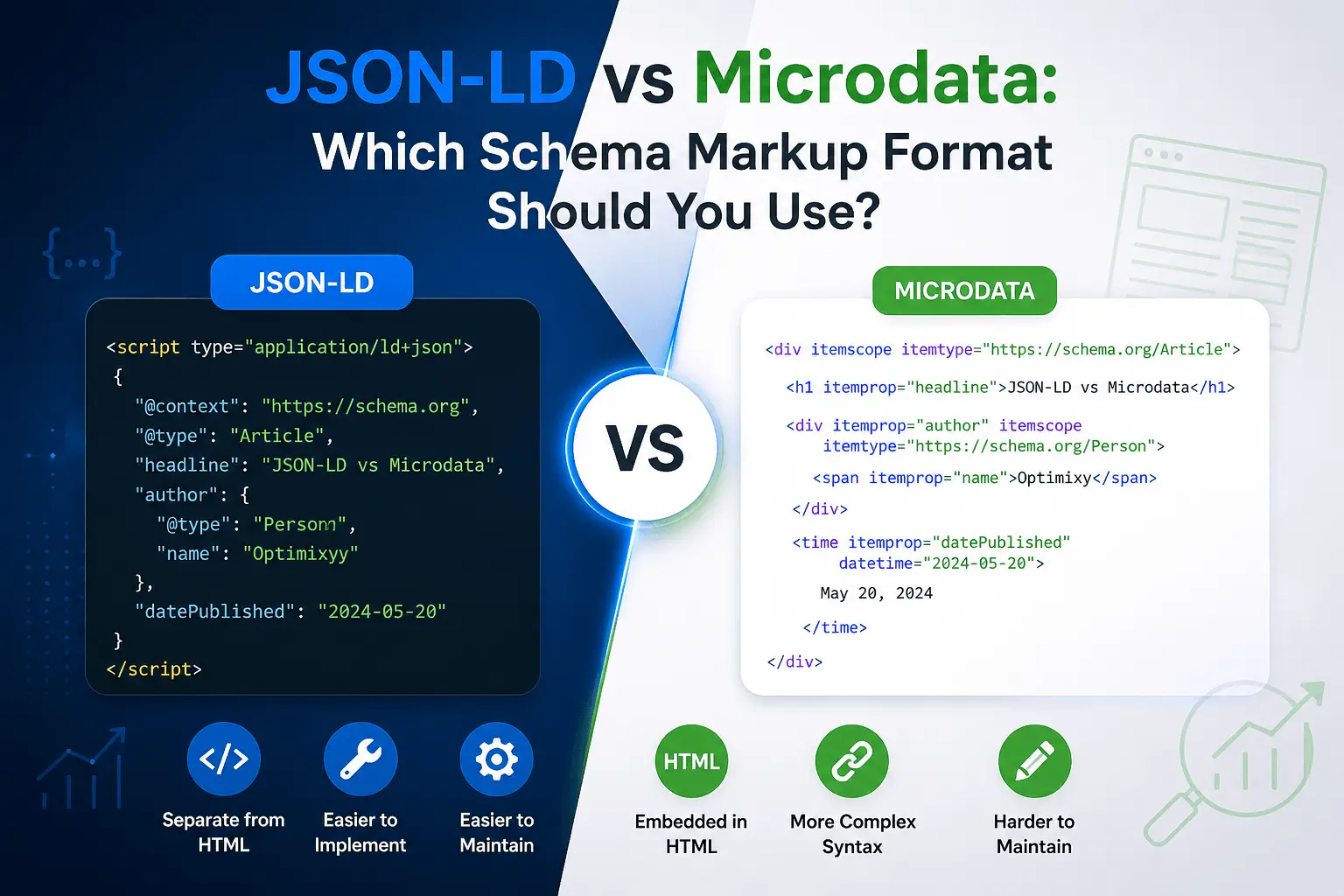
Strip away the jargon and it's just a block of JavaScript code that sits in the <head> section of your page. It's self-contained. It doesn't touch your content. It's just a structured description of what the page contains, written in a format that search engines can parse.
It looks like this:
That block tells Google: this page is an article, written by this person, published on this date. The code sits in the header. The content stays clean. If you need to update the schema, you change the header block without touching the body of the page.
Google adopted JSON-LD as the recommended format back in 2015. It's been the standard for almost a decade now. Most recent structured data examples and Google documentation primarily use JSON-LD, making it the recommended format for new implementations.
Our what is schema markup guide goes deeper on how structured data works if you're new to all of this.
What Is Microdata Schema
Microdata is the older format. Instead of a separate code block, Microdata adds attributes directly to your existing HTML elements.
It looks like this:
See the difference? The schema information is woven into the content markup. itemscope declares that everything inside this div is a schema type. itemprop labels each piece of data. The content and the schema are tangled together.
Microdata was the original way to add structured data. Back when schema.org launched in 2011, this was the primary format. RDFa existed too, which is similar but with different syntax. Most developers picked one and stuck with it.
Microdata still works. Google still parses it. Rich results can still appear. It's not deprecated or anything. It's just... the harder way.
JSON-LD vs Microdata: At a Glance
| Feature | JSON-LD | Microdata | RDFa |
| Google's preferred format | ✅ | ❌ | ❌ |
| Easy to maintain | ✅ | ⚠️ | ⚠️ |
| Keeps HTML clean | ✅ | ❌ | ❌ |
| Supported by Google | ✅ | ✅ | ✅ |
| Best for new websites | ✅ | ❌ | ❌ |
| Works with dynamic injection | ✅ | ❌ | ❌ |
JSON-LD vs Microdata: The Practical Differences
Most people don't choose JSON-LD because it's more powerful. They choose it because it's easier to live with six months later. Here's what actually matters.
JSON-LD goes in the header. One block. Easy to find. Easy to update. If something goes wrong, you know exactly where to look.
Microdata goes throughout the page content. Scattered. Mixed in with your HTML. If something breaks, you're hunting through your template files trying to find the stray tag that's causing problems.
JSON-LD doesn't care about your page design. Change your layout, redesign your site, switch themes. The schema stays intact because it lives in the header, separate from everything visual.
Microdata is tied to your HTML structure. Change a div to a section. Move content around. Redesign your product page. Suddenly your schema is broken because the itemprop tags are in the wrong place or wrapped around the wrong elements. Design changes become schema problems.
JSON-LD is easier to generate programmatically. Most schema markup generators output JSON-LD. Our free schema markup generator uses JSON-LD. Most CMS plugins add JSON-LD. The ecosystem has standardized around it.
Microdata is harder to generate with tools. It requires modifying your actual page templates. Each schema type needs different HTML attributes in different places. It's manual work for every template.
JSON-LD supports all schema types. The full vocabulary is available. Product. Article. FAQ. HowTo. Event. LocalBusiness. All of it.
Microdata also supports all schema types. The vocabulary is the same. The implementation is just messier.
Neither format has an SEO advantage. Google treats them equally. There's no ranking difference between a page with JSON-LD and a page with Microdata. Both can generate the same rich results. It's purely an implementation preference.
Why Google Recommends JSON-LD
Google has been clear about this for years. Their documentation says:
"Google recommends using JSON-LD for structured data whenever possible."
Not a suggestion. A recommendation.
There are a few reasons they prefer it.
JSON-LD is easier for their crawlers to parse. The structured data is isolated in one place. Googlebot doesn't have to extract schema information from scattered HTML attributes. It finds the JSON block, reads it, moves on.
JSON-LD is less prone to errors caused by theme changes. Google has seen too many cases where valid Microdata stopped working because someone updated their page template and accidentally removed an itemprop attribute. JSON-LD doesn't have that problem.
JSON-LD can also be injected dynamically with JavaScript, although Google generally recommends ensuring important structured data is available when the page is rendered. You can add schema markup using JavaScript or tools such as Google Tag Manager when appropriate. Microdata can't do that easily because it needs to be in the initial HTML.
And from a support perspective, most new structured data features from Google launch with JSON-LD examples first. Microdata examples come later, if at all. It's clear which format they're prioritizing.
If you want to dive deeper into implementation, our how to add schema markup guide walks through the process step by step for JSON-LD specifically.
When Microdata Still Makes Sense
I said JSON-LD is almost always the right choice. The keyword is "almost."
There are a few edge cases where Microdata still has a place.
Legacy sites that already have Microdata. If you have a site built in 2014 with Microdata templates and everything is working fine, ripping it all out and replacing it with JSON-LD is probably not the best use of your time. If it's not broken, don't fix it just to be modern.
Email HTML. This is a weird one. Some email clients parse Microdata but can't handle JSON-LD. If you're adding schema to email templates for things like order confirmations and booking reminders, Microdata sometimes works better in that specific environment.
Server-rendered applications where injecting JSON-LD into the header requires architectural changes. If adding a header script tag means restructuring how your application renders pages, and you already have Microdata support built into your components, the migration might not be worth it.
Ecommerce platforms that use Microdata by default. Some older Shopify themes and Magento installations come with Microdata baked into the product templates. If you're not a developer, changing this means hiring someone or finding a plugin that handles the migration.
But for new projects? New sites? New features on existing sites? Use JSON-LD. There's no reason to start with Microdata in 2026 unless one of those specific edge cases applies.
JSON-LD vs Microdata Examples
Sometimes seeing the same thing in both formats makes the difference clearer.
Here's product schema in JSON-LD:
Clean. Self-contained. Nothing to do with the page content.
Here's the same product schema in Microdata:
Same information. But now it's mixed into the HTML. The heading has an itemprop. The price is wrapped in a span with attributes. The availability is a hidden link tag. If someone redesigns the product page and changes the heading element from h1 to h2, does the schema still work? Probably. But it's one more thing to check.
FAQ schema in JSON-LD:
FAQ schema in Microdata:
The JSON-LD sits in the header, untouched by content edits. The Microdata is woven into the FAQ section. If you restyle your FAQ layout, you might break the schema.
What About RDFa
Someone always asks about RDFa when this topic comes up. Here's the short version.
RDFa is the third schema markup format. It's similar to Microdata. It adds attributes to HTML elements. The syntax is slightly different. Instead of itemprop, RDFa uses property. Instead of itemscope and itemtype, RDFa uses vocab and typeof.
It looks like this:
It's fine. It works. Google supports it. But it's the least common format and there's basically no reason to choose it over JSON-LD for a new project. If you have an existing site with RDFa, don't panic. It still works. But don't start something new with it.
Common Mistakes When Choosing a Schema Format
People don't make a lot of mistakes here. The choice is usually obvious. But I've seen a few things worth mentioning.
Using multiple formats on the same page for the same schema type. Don't add JSON-LD Product schema AND Microdata Product schema to the same product page. Google might get confused. Pick one. Use it consistently.
Mixing formats without realizing it. Your plugin adds JSON-LD. Your theme adds Microdata. They both describe the same article. Google sees duplicate schema. Check what's already on your pages before adding more. Our free SEO checker can detect existing schema on your site. If you're seeing duplicate schema warnings, our common schema errors guide covers how to fix them.
Choosing Microdata because someone's old blog post recommended it. That blog post was probably written in 2013. Things have changed. JSON-LD is the standard now.
Overthinking the choice. The format decision matters less than whether the schema is correct and complete. A well-implemented Microdata setup beats a broken JSON-LD setup every time. Focus on accuracy first. Format second.
How to Check Which Format Your Site Uses
If you're not sure what's already on your site, check.
Open a page. Right click. View Page Source. Search for application/ld+json. If you find it, you have JSON-LD.
Search for itemscope or itemprop. If you find those, you have Microdata.
Search for typeof or property with schema.org prefixes. If you find those, you have RDFa.
You might have none. You might have multiple. Knowledge is better than guessing.
Google Search Console also shows detected schema under the Enhancements section. It doesn't always tell you which format was used, but it confirms whether Google found valid structured data.
Our schema markup checklist helps audit what schema types your site needs regardless of which format you choose.
How to Migrate from Microdata to JSON-LD
If you have an older site with Microdata and want to switch, here's what I'd suggest.
Always back up templates before removing Microdata.
During a planned migration, it's generally acceptable to temporarily have both formats while testing, provided they describe the same content consistently. Once JSON-LD is validated, remove the older markup.
Add JSON-LD to one page first. Test with the rich results tester. Make sure it validates. Check for duplicate schema warnings. If the test shows both Microdata and JSON-LD for the same type, that's okay temporarily.
Once the JSON-LD is working, remove the Microdata from that page. Test again. Make sure the schema is still detected correctly.
Then move to the next page. Roll out the change gradually. Don't update every template on your site simultaneously. If something breaks, you want to catch it on one page, not every page.
For most small sites, this migration takes an afternoon. For large sites with custom templates, it might take longer. The good news is there's no rush. Microdata isn't going anywhere. Take your time and get it right.
How Schema Format Affects Performance
This comes up more often than you'd expect.
JSON-LD adds a small amount of bytes to your page. A typical block is maybe 1-3 kilobytes. That's nothing. Your page probably loads images that are a thousand times larger.
Microdata adds even less overhead because it's just HTML attributes. But the difference is so small it's not worth measuring.
Neither format will noticeably affect your page speed. If someone tells you JSON-LD is faster or Microdata is lighter, they're technically correct in a way that doesn't matter at all. Like arguing whether a paperclip weighs more than a staple.
Focus on the maintainability difference. That's where the real tradeoff lives.
Use JSON-LD.
That's the short answer. For almost every website, almost every use case, almost every situation, JSON-LD is the right choice. It's what Google recommends. It's easier to implement. It's easier to maintain. It survives design changes without breaking.
If you're ready to implement it, follow our complete guide on how to add schema markup for step-by-step instructions.
Microdata still works. It's not going to stop working tomorrow. If your site already uses it and everything is fine, there's no emergency. But if you're starting something new, or adding schema to pages that don't have any yet, go with JSON-LD.
Don't overthink this. The format matters way less than whether your schema is accurate, complete, and actually matches what's on the page. Get that right first. The format is just plumbing.
Ready to switch to JSON-LD?
- Generate your schema with our free schema markup generator.
- Validate it using our rich results tester.
- Review your implementation with the schema markup checklist.
- Monitor the page in Google Search Console after indexing.