I've been doing SEO for a while now. Structured data is one of those things that sounds way more complicated than it actually is.
The first time someone tried to explain schema markup to me, they used words like "JSON-LD implementation" and "structured data vocabulary." My eyes glazed over. I nodded along. I understood nothing. Then I nodded some more.
Turns out the concept itself is pretty simple. The execution can get technical if you let it. But for most site owners, the basics cover 90 percent of what you need. Maybe more.
So here's what schema markup actually is, why it matters, and how to use it without getting a headache. Or at least a smaller headache.
What Is Schema Markup
Schema markup is code you put on your website that tells search engines what your content means.
Not what it says. What it means.
A normal web page might have the words "chocolate chip cookies" and "25 minutes" and "350 degrees" somewhere in the text. Google can read those words. But it doesn't know if this is a recipe, a blog post about someone burning cookies, or a product page selling cookie ingredients. It's just words on a page.
Schema markup tells Google: this is a recipe. The cook time is 25 minutes. The oven temperature is 350 degrees. It has 4.5 stars from 200 reviews.
That extra understanding lets Google show richer results in search. Star ratings under your link. Cooking time displayed. Calorie counts. FAQ questions with expandable answers. All that stuff you see in search results that stands out from the plain blue links. You've seen it. The results that make you stop scrolling for a second.
That's what structured data does. It structures your data. Makes it machine readable. The name is actually descriptive for once. Rare in SEO.
Schema.org is the project behind it. Started by Google, Bing, Yahoo, and Yandex back in 2011. They all agreed on a common vocabulary so site owners wouldn't need different markup for different search engines. One format. Everyone reads it. At least in theory.
The current standard format is JSON-LD. That stands for JavaScript Object Notation for Linked Data. Don't memorize that. I'm not sure I even have that right and I've typed it hundreds of times. What matters is it's a block of code you paste into your page header, and it's the format Google prefers. Wondering whether you should use JSON-LD or Microdata? Our JSON-LD vs Microdata comparison explains the differences, when each format makes sense, and why Google recommends JSON-LD for most websites.
How Schema Markup Works
When Googlebot crawls your page, it reads your content like normal. But it also looks for structured data in the code. Two things at once.
If it finds valid schema markup, it says "oh, this is a product with a price of $29.99 and 4.2 stars from 87 reviews." That understanding can trigger rich results in search. Can. Not will.
Not every page with schema gets rich results. Google decides when to show them. I've had pages with perfect markup sit there for months with no rich result appearing. Then one day it just shows up. No explanation. No notification. Adding schema is like submitting your page for consideration. It helps. It doesn't guarantee anything.
The types of rich results you see depend on the schema type you use. Products can show prices and availability. Recipes show cook time and ratings. Articles show publish dates. Events show dates and locations. FAQs show expandable questions. How-to articles show step thumbnails.
Each schema type has its own properties. Some types are simple. A few fields and you're done. Others have dozens of optional fields you'll never use. The full list is enormous. Schema.org has hundreds of types. Most sites only use a handful. Maybe two or three types across their whole site. That's normal.
If writing code isn't your thing, you can use a free schema markup generator to create the JSON-LD without touching any brackets or commas. Paste in your info, get the code out, add it to your page. Takes about five minutes once you know what type you need.
Why Schema Markup Matters for SEO
Schema markup isn't a direct ranking factor. Google has said this repeatedly. Multiple times over the years.
But here's where it gets interesting.
Rich results take up more space in search results. A result with star ratings and price information visually dominates a plain text link. More space means more attention. More attention means more clicks. It's not complicated.
I've seen pages where adding schema markup didn't change their ranking position at all. They stayed at position four. But their click through rate jumped noticeably because suddenly their result had five gold stars under it while the competitors had nothing. Same rank. More traffic. That's the game.
That's the real value. Not ranking higher. Standing out more at the same position. It's a visibility play more than a ranking play.
Structured data helps Google understand your content better. Better understanding can mean better ranking for long tail queries that are closely related. If Google knows your page contains a specific product with a specific price and specific attributes, it can match that page to very specific searches.
And some rich results are becoming necessary for certain types of content. Recipe blogs without structured data barely get traffic anymore. The recipe carousel and rich results dominate the top of the page. If you're not in them, you're invisible.
Voice search relies heavily on structured data too. When someone asks their smart speaker a question, the answer often comes from a page with proper schema markup. Our SEO guide for beginners covers more about how search behavior is changing if you want the broader picture. Though it's changing faster than most guides can keep up with.
Types of Schema Markup Worth Knowing
There are hundreds. You probably need like three.
Most blogs are fine with Article schema and Breadcrumb schema. Ecommerce sites usually care more about Product markup because that's what creates the price and review snippets in search. Local businesses lean on Local Business schema. Recipe sites obviously need Recipe.
If you're on WordPress, most SEO plugins already handle a decent chunk of this. Yoast and RankMath add basic schema automatically. Article type. Breadcrumbs. That kind of thing. They won't cover every type but they handle the common ones without you doing anything.
Article schema is for blog posts and news articles. Article schema tells search engines about your headline, author, publication date, featured image, and more. Our Article Schema Guide explains how to implement it correctly and improve your article markup. If you have a blog and add nothing else, add this.
Product schema is for ecommerce pages. Product schema helps search engines understand prices, availability, ratings, and other product details. If you run an online store, read our complete Product Schema Guide for implementation examples, required properties, and validation tips. This is the one that puts star ratings under your product pages in search results.
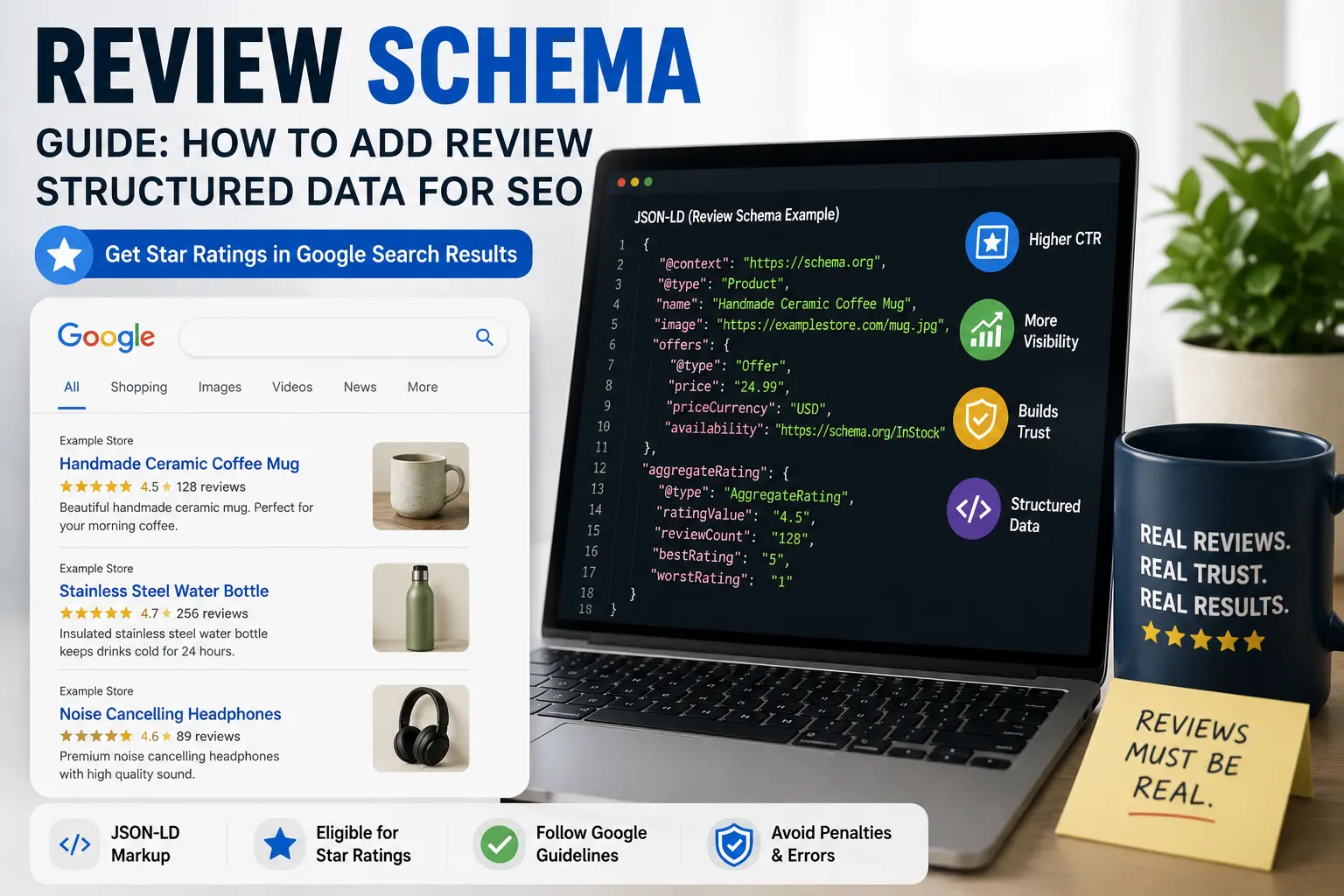
If your website collects customer ratings or reviews, review markup deserves special attention. Our Review Schema Guide explains eligible review markup, required properties, and Google's guidelines for review snippets.
Local Business schema is for businesses with a physical location. Local Business schema helps search engines understand your business name, address, phone number, opening hours, and location details. Our Local Business Schema Guide covers setup, validation, and local SEO best practices. Not optional for local SEO anymore really.
FAQ schema lets search engines understand your questions and answers, which can make eligible pages easier to interpret. Our FAQ Schema Guide explains when to use it, Google's current recommendations, required properties, and common mistakes to avoid. Google has gotten stricter about this one though. The FAQs in your schema need to match what's actually on the page.
I'm skipping a bunch of types here. There are more. How-to schema. Event schema. But honestly, if you're just starting out, pick the one that matches your main content and deal with the rest later. Our schema markup checklist maps out which types fit which sites if you're not sure.
How to Add Schema Markup to Your Site
There's a few ways. They all work.
If you're new to structured data, our complete guide on how to add schema markup walks through creating JSON-LD, adding it to your website, validating it, and fixing common implementation mistakes.
The manual way. Write JSON-LD code and paste it into your page header. Google has examples in their documentation. It looks intimidating at first. A bunch of brackets and commas. But once you've seen the pattern it's mostly copy and paste with your own details swapped in. I still mess up commas sometimes.
If writing code makes you want to close your laptop, use a free schema markup generator. Fill in a form. Get the code back. Paste it onto your page. Nobody cares how the code was created. Google just reads the output.
Google Tag Manager can inject JSON-LD onto pages too. Useful if you don't want to edit your theme files directly. A bit more setup but flexible.
Whatever method you pick, test it after. Before validating your code with Google's tool, run it through our free rich results tester to detect structured data issues. It tells you what schema types were detected and if there are errors. Fix the errors. Retest. Don't skip this step.
Then check Google Search Console under the Enhancements section. It shows which schema types Google has detected on your site and whether there are issues. If Google still doesn't detect your structured data after implementation, use our free indexability checker to verify that the page can actually be crawled and indexed. Valid schema with warnings might still work. Errors usually mean the rich result won't show. Fix errors first, worry about warnings later.
Since structured data works alongside your page metadata, it's also worth checking your title tags, meta descriptions, and robots directives using our meta tag checker. Schema is only one part. Our on-page SEO checklist covers the rest of the optimizations every page should have.
Schema Markup Examples
Here's what article schema looks like.
That's it. Name, type, headline, author, date, image. Paste that in your header and Google understands you published an article on May 28th with a specific title and author. If your featured image is too large, run it through our image compressor or PNG to WebP converter before adding it to your schema.
Product schema is similar but different properties.
The pattern repeats across most types. Define what it is. List the properties. Close the brackets. Test it. Move on.
FAQ schema follows the same logic. Question and answer pairs inside an FAQPage type. Same structure, just different property names depending on the type.
Common Schema Markup Mistakes
Many structured data problems come from small implementation mistakes. Before publishing, review the most common schema markup errors and learn how to fix them to improve your chances of valid structured data.
I've made most of these.
Adding schema markup where the content doesn't match what's on the visible page. If your schema says the product costs 24.99, Google considers that spam. The structured data has to reflect what users actually see. Happens constantly when people update prices on the page and forget the schema.
Using the wrong schema type. A blog post isn't a product. A product page isn't an article. I've seen people slap Product schema on their homepage hoping for star ratings. Doesn't work.
Putting FAQ schema on pages that don't actually have FAQs. Google now discourages this pretty strongly. The questions and answers in your schema need to be present in your visible page content. No hiding them in code only.
Missing required properties. Each schema type has required fields. Product needs a price. Review needs the item being reviewed and the rating value. Skip required fields and the schema is invalid.
Not testing after adding. Schema looks fine in your editor. Then you test it and discover a missing comma or bracket that breaks everything. Always test. It takes thirty seconds.
Putting schema on every page when it only applies to some. Article schema on your privacy policy page makes no sense. Be selective.
Forgetting to update schema when page content changes. Changed a product price? Update the schema too. Old structured data sends conflicting signals.
How to Check If Your Schema Is Working
Google provides free tools for this.
The Rich Results Test checks a single URL against Google's supported rich result types. Tells you what was detected and whether there are problems. Good for testing individual pages. Our free rich results tester does the same thing and is useful for quick validation during development.
Google Search Console's Enhancements section gives you a site wide view. Shows all schema types Google has found, how many pages have each type, and whether there are errors or warnings. I check this maybe once a month unless I've recently added new schema types.
Run the checks after adding new schema. Then check occasionally to make sure nothing broke during site updates. Plugins update. Themes change. Schema can break silently and you won't know unless you check.
Even perfect schema won't help if Google can't crawl your pages. Verify your robots.txt configuration with our robots.txt tester before troubleshooting structured data.
Does Schema Markup Help Rankings
Not directly.
But it helps in ways that can matter.
Rich results improve click through rates. Higher CTR can lead to more traffic at the same ranking position. Sustained higher CTR signals to Google that people find your result useful. That could influence rankings over time. But anyone who tells you schema is a direct ranking factor is oversimplifying.
Schema also reduces pogo-sticking. When someone sees your star rating or FAQ answers right in the search results, they already know what to expect before clicking. They're more likely to find what they want when they land. Less bouncing back to search results. Google notices.
For certain query types, structured data is becoming table stakes. Recipe search. Product results. Local business panels. If all your competitors have rich results and you don't, you look incomplete even at the same rank.
After implementing schema, run a complete seo audit using our free SEO checker. It can identify if your pages are missing schema markup alongside other technical SEO issues.
Schema Markup and AI Search
Search is changing. AI overviews and generative results are becoming more common.
Structured data helps here. When AI systems need to extract specific information from web pages, pages with clear schema markup are easier to parse. Your product price and availability are explicitly labeled in the code rather than buried in a paragraph.
I can't say for certain how much this matters yet. The AI search landscape shifts every few months. But making your content machine readable has never been a bad bet. It's one of the few SEO tactics that feels relatively future proof.
Some newer schema types are specifically designed for AI understanding. Digital document type. Scholarly articles. Datasets. Most bloggers won't need these. But it shows where things are heading.
How Schema Fits Into Everything Else
Schema markup is one piece. Not the whole thing.
You still need good content. You still need proper on-page SEO. You still need a technically sound site that Google can crawl properly. Our crawl budget guide covers the crawling side if your site has grown large enough for that to matter.
Schema without good content is just clean code on a page nobody wants to read.
Content quality gets you ranked. Schema markup makes your result more appealing to click. Internal links connect everything together. Our internal linking checklist helps with that part. They all work together.
Schema is relatively easy to implement compared to other SEO tactics. You add the code, Google recrawls the page, and rich results can appear within days or weeks. That's fast by SEO standards.
Should Small Sites Bother With Schema
Yeah. But don't overdo it.
A blog with twenty posts needs Article schema and maybe Breadcrumb schema. That takes about ten minutes. Worth doing.
A local business needs Local Business schema. Name, address, phone number, hours. Also ten minutes. Also worth doing.
You don't need every schema type on every page. Most sites run fine with one or two types. The people who try to implement twenty schema types on a five page site are wasting time.
Start with the type most relevant to your content. Add more later if it makes sense. Don't wait until you understand every type and property. That could take years. I've been doing this a while and I still look up property names sometimes.
Related Schema Markup Guides
Want to learn more about structured data? These guides cover implementation, validation, and common schema types.
- How to Add Schema Markup
- JSON-LD vs Microdata
- Article Schema Guide
- Product Schema Guide
- FAQ Schema Guide
- Review Schema Guide
- Local Business Schema Guide
- Common Schema Errors
- Schema Markup Checklist
- Free Schema Markup Generator
See Also
Ready to implement structured data? Generate your markup with our free schema markup generator, validate it using the rich results tester, then review the schema markup checklist before publishing.
Schema markup is one of the easier SEO wins. Add the code. Test it. Move on.
If you haven't added any yet, pick one type. Article if you blog. Product if you sell things. Local Business if you have a physical location. Generate the code somehow. Paste it in. Test it.
Don't overcomplicate it. Get the basics in place. See if rich results start appearing. Add more types later if it makes sense.
And if the code part makes your head hurt, use the generator. There is no prize for typing JSON by hand.