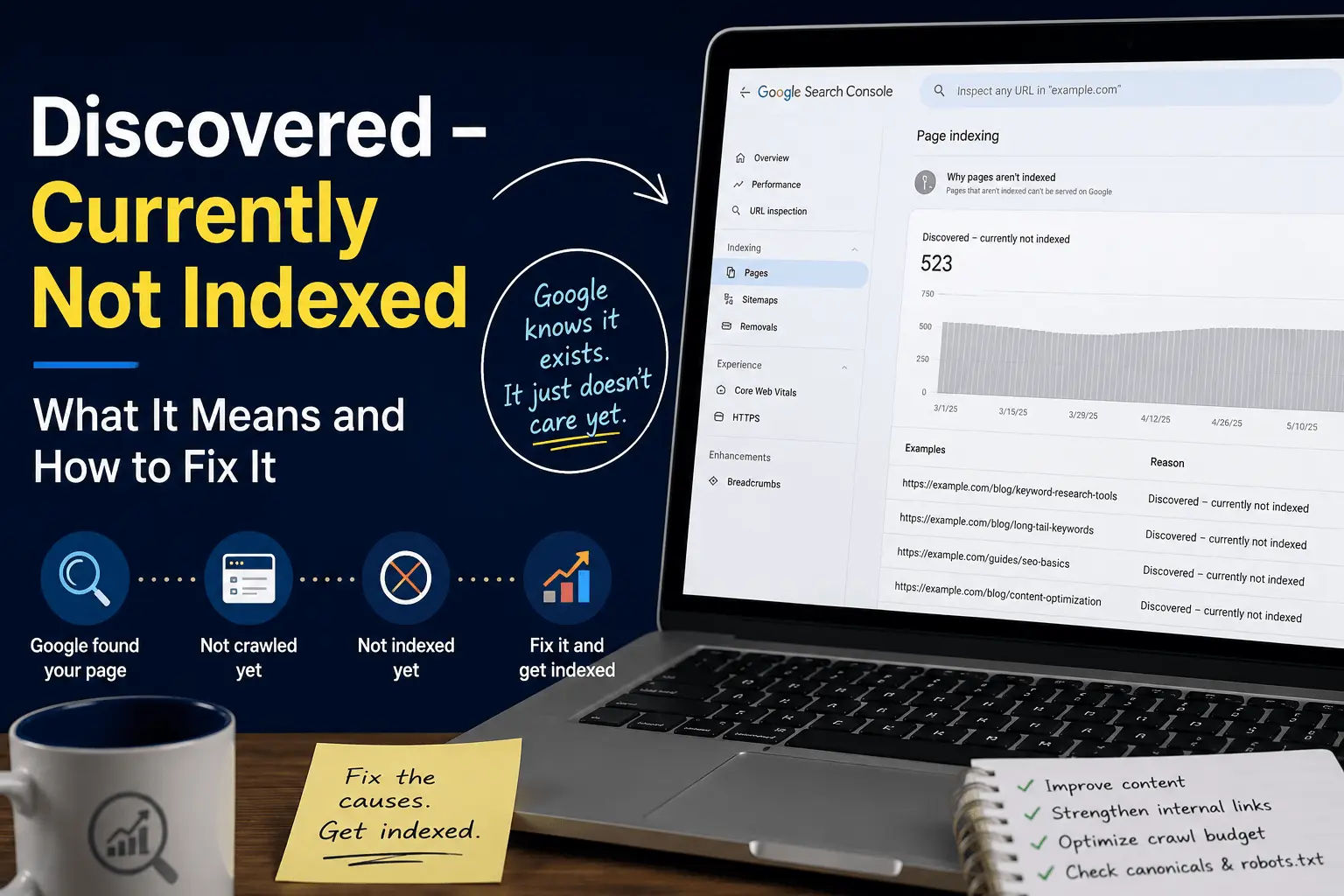
You open Search Console. Check the Pages report. And there it is. A whole list of pages sitting under "Discovered – currently not indexed."
Google knows your pages exist. It found them. Probably through your sitemap. Maybe through internal links. But it hasn't crawled them. And it definitely hasn't indexed them.
This is one of those Search Console statuses that looks worse than it sometimes is. But it can also be a real problem if the pages matter and they've been sitting in this status for weeks or months.
The first time I saw this status on a client site, there were about 400 pages in the queue. I panicked. Thought something was broken. Spent an afternoon checking robots.txt, noindex tags, canonical settings. Everything was fine. Google just hadn't gotten around to crawling them yet. Most of them got indexed over the next few weeks without me doing anything. Some didn't. That's when I realized this status is as much about patience as it is about fixes.
What Does "Discovered – Currently Not Indexed" Mean
This status means Google found your URL. It added it to its list of pages to crawl. But it hasn't gotten around to crawling it yet. And because it hasn't crawled it, it hasn't indexed it.
It's different from "Crawled – currently not indexed." That status means Google visited the page, read the content, and decided not to index it. That's a quality judgment. Someone at Google, or more likely an algorithm, looked at your page and said no.
"Discovered" is more of a queue status. Your page is in line. It's just a very long line and Google hasn't reached your page yet. Or it looked at the line, decided other pages were more important, and keeps skipping yours.
I've seen pages sit in this status for months. Some eventually get crawled. Some never do. It depends on why Google is deprioritizing them. The waiting is the hardest part to explain to site owners. They want a button to press. A fix to implement. Sometimes the fix is just time.
One thing worth understanding: Google doesn't try to index every crawlable page anymore. Modern indexing is more selective than it was years ago. Even technically perfect pages may remain unindexed if Google doesn't see enough unique value compared to existing indexed content. The bar for what earns a spot in the index has been rising steadily. I've watched pages that would have been indexed without question five years ago sit in the queue indefinitely now.
Why Google Discovers Pages But Doesn't Index Them
There are a handful of reasons this happens. Some are technical. Some are about content quality. Some are about site authority.
The most common reason is crawl budget. Google allocates a certain amount of crawling time to each site. If your site has more pages than Google is willing to crawl within that budget, some pages sit in the queue. They're discovered but not crawled. Not indexed.
This happens a lot on large sites. Ecommerce stores with thousands of products. Blogs with years of archives. Sites with faceted navigation creating endless URL variations. Google discovers all of them. It just can't crawl all of them in a reasonable timeframe.
I once audited an ecommerce site with about 50,000 URLs. Google was crawling roughly 2,000 pages a day. The math was simple. It would take nearly a month just to crawl everything once. New products were getting discovered but sitting in the queue for weeks before Google got to them. The fix wasn't about the individual pages. It was about reducing the total number of URLs Google needed to crawl.
Our crawl budget guide covers how Google prioritizes crawling in detail.
Another common reason is low page quality signals. Google sees the URL. Maybe it looks at some signals before crawling. If those signals suggest the page might not be worth indexing, Google deprioritizes it. The page stays discovered but never gets crawled.
Signals that can deprioritize a page include no internal links pointing to it, being deep in the site structure, having a URL pattern that looks like low-value content, or being on a site where many similar pages have already been crawled and not indexed.
Google doesn't always evaluate pages in isolation. Large volumes of thin, duplicate, or low-value pages can affect how aggressively Google crawls and indexes the rest of the site. The overall quality signal matters. I've seen sites where cleaning up 200 thin pages improved crawl frequency for the remaining 50 important ones. Not because those 50 pages changed. Because the site-wide quality signal improved.
Duplicate or near-duplicate content is another factor. If Google discovers fifty pages that look very similar based on the URL pattern or the sitemap, it might crawl a few and leave the rest in the discovered queue. It assumes the others are variations of the same thing.
Sometimes it's a canonical issue. The page is discovered, but Google sees a canonical tag pointing to a different URL. It decides the canonical is the one worth crawling and leaves the discovered page in the queue indefinitely.
And sometimes it's just timing. New sites. New pages. Google is slower to crawl pages on sites it doesn't trust yet. The pages are discovered. They'll get crawled eventually. It just takes longer than anyone wants. I've launched new sites where the first batch of pages took three weeks to get indexed. By month six, new pages were getting indexed in two days. Trust builds slowly.
How to Check Which Pages Have This Status
Search Console makes this easy to find.
Open the Pages report under Indexing. Scroll down to the "Why pages aren't indexed" section. Look for "Discovered – currently not indexed." Click it.
You'll see a list of URLs with this status. The list might be short. It might be very long. I've seen sites with a few pages here and sites with thousands. The first time you see a big number, it's alarming. Take a breath. Most of those pages might be fine. They're just waiting.
Click through to see specific URLs. Look for patterns. Are they all blog posts from a certain category? All product pages with a specific tag? All URLs with a certain parameter? Patterns help identify the root cause.
Also check the date range. Are these recently discovered pages that might just need more time? Or pages that have been sitting in this status for months? Old pages in this status are a stronger signal that something is wrong. I pay more attention to pages that have been in the queue for over a month than pages that showed up last week.
Our free indexability checker can scan your pages and identify indexing status across multiple URLs.
Does Request Indexing Still Work in 2026?
Yes, the Request Indexing feature in Search Console still works. But it's not a magic button. It's a queue jump, not a quality override.
Requesting indexing tells Google to add your page to the priority crawl queue. It gets crawled sooner than it would have otherwise. But crawling doesn't guarantee indexing. If the page has quality issues, duplicate content, or thin substance, Google may still choose not to index it.
For important pages with genuinely good content, requesting indexing is useful. It speeds up the normal discovery process. For pages with underlying problems, requesting indexing just gets them rejected faster. I've watched site owners request indexing for the same thin page week after week, hoping for a different outcome. It never changes. Google reads the page. Google decides. The button just speeds up the decision.
Use it for pages that deserve to be indexed. Don't use it hoping it will override a quality judgment. It won't.
Our how to request indexing guide covers when to use this feature and when to skip it.
How to Fix "Discovered – Currently Not Indexed"
The fix depends on why the page is stuck. Here's how I usually work through it.
For important pages, you can request indexing manually in Search Console using the URL Inspection tool. This may speed up discovery, but it won't solve underlying quality, crawl, or duplication issues. If the page isn't worth indexing, requesting indexing won't change that.
Don't request indexing for hundreds of pages. Google limits how many manual requests you can submit. Use it for important pages you want prioritized. I usually save manual requests for the top 10 to 20 pages that actually move the needle.
If manual requests don't work, or if you have too many pages for that approach, dig deeper.
Check the page quality. Is this a page that deserves to be indexed? Be honest. A thin tag page with no content beyond links to other pages. A product page with a stock photo and one sentence. A blog post that's 150 words long. Google might be deprioritizing it because the quality isn't there.
Improve the content. Add substance. Make it unique. Give Google a reason to crawl it.
Check your internal linking. Can Google find this page through links on your site? Or is it only in the sitemap? Pages that only exist in sitemaps, with no internal links pointing to them, are lower priority for crawling. Add links from other relevant pages. Make the page part of your site structure, not just a sitemap entry. External links from other websites can also help with discovery and crawling over time. Our link building guide covers earning links that support your SEO.
Our internal linking checklist helps with link structure if that's the issue.
Check for crawl budget waste. If Google is spending its crawl budget on low-value pages, important pages stay in the queue. Block faceted navigation URLs. Block internal search results. Block parameter-based duplicates. Free up crawl budget for the pages that matter.
Check your canonical tags. If the discovered page has a canonical pointing somewhere else, Google will prioritize the canonical URL. That's correct behavior. The discovered page shouldn't be indexed if it's canonicalized elsewhere. But if the canonical is wrong, fix it.
Check your sitemap. Is the page in your sitemap? Is your sitemap clean? Remove noindexed pages, blocked pages, and canonicalized duplicates from the sitemap. A messy sitemap sends mixed signals.
Our XML sitemap generator creates clean sitemaps that only include pages worth crawling.
If you have a large site with systemic crawl budget issues, you might need a bigger fix. Restructure your site architecture. Improve internal linking. Block low-value sections. Speed up your server. These aren't quick fixes but they address the root cause.
Content Quality and "Discovered – Currently Not Indexed"
This connection isn't always obvious. The page hasn't been crawled yet. How can Google judge its quality?
Google makes assumptions. URL patterns. Site structure. Similar pages that have been crawled. If you have a hundred pages with similar URL patterns and Google crawled fifty of them and decided they were thin, the remaining fifty might stay in the discovered queue. Google assumes they're similar.
I've seen this with programmatic SEO sites that generate thousands of pages targeting long-tail keywords. The first batch gets crawled. If those pages are thin, the rest sit in "discovered" indefinitely. The site owner is confused because the pages haven't even been evaluated yet. But they have been evaluated, indirectly. Google judged the pattern and applied that judgment to the rest.
The fix is making the pages worth crawling. Not just for the ones that are stuck. For the ones Google already crawled too. If crawled pages are thin, improve them. That improves the quality signals for the rest of the site.
Our SEO content writing guide covers creating content that earns indexing and rankings.
When "Discovered – Currently Not Indexed" Is Normal
This status isn't always a problem.
New pages on new sites often sit in this status for a few weeks. That's normal. Google is still figuring out your site. Be patient. Request indexing for the most important pages. Wait.
Pages you don't want indexed might show up here. If you have a canonical tag pointing to the real page, the canonicalized version might appear as "discovered not indexed." That's fine. It shouldn't be indexed. The canonical page is the one that matters.
Pages blocked by robots.txt sometimes appear here. Google discovers the URL through a sitemap or external link but can't crawl it because of the block. If the block is intentional, this status is expected.
The status matters when important pages sit here for months. If your money pages, your best content, your product pages are stuck in "discovered not indexed," that's a problem worth fixing.
How Long Should You Wait Before Worrying
A few weeks is normal. Especially for new sites.
A month is worth investigating. Check Search Console. Look for patterns. Try manual indexing requests.
Two months or more with no movement is a problem. Something is preventing Google from crawling those pages. Time to dig into the reasons above.
The timeline also depends on your site's crawl frequency. Established sites with good authority might see pages move from discovered to indexed in days. Small new sites might wait weeks or months. That's just how Google's crawl scheduling works.
Our guide to Google not indexing pages covers the broader indexing troubleshooting process if you want a wider view.
Preventing "Discovered – Currently Not Indexed" Problems
The best fix is prevention.
Don't publish thin pages. If a page isn't substantial enough to index, ask whether it should exist. Not every URL needs to be in Google. Some pages serve other purposes. I've deleted pages that had been in the discovered queue for six months. They were never going to get indexed. Removing them cleaned up the site and let Google focus on what mattered.
Build strong internal linking. Every important page should have links from other pages on your site. Don't rely on sitemaps alone for discovery and prioritization.
Keep your sitemap clean. Only include pages you want indexed. Remove blocked pages, noindexed pages, and canonicalized duplicates.
Manage your crawl budget. Block low-value sections of your site. Fix duplicate content. Speed up your server. Help Google focus on the pages that matter.
Monitor Search Console regularly. Catch indexing issues early before hundreds of pages pile up in the discovered queue.
Our crawlability and indexing checklist covers the preventive steps in more detail.
"Discovered – currently not indexed" is frustrating because it feels like your pages are stuck in limbo. Google knows they exist. It just doesn't care enough to crawl them. I've felt that frustration. I've also learned that most of the time, the fix isn't complicated. It just requires honesty about which pages actually deserve to be indexed.
The fix usually comes down to a few things. Improve the content. Add internal links. Clean up your sitemap. Manage your crawl budget. Request indexing for important pages. Then wait.
What doesn't work is panicking and resubmitting your sitemap seventeen times. Or clicking "Request Indexing" for every single URL every single day. Google notices that and it doesn't help. Requesting indexing speeds up discovery. It doesn't override quality judgments or force indexing.
Focus on making the pages worth crawling. If Google sees signals that your content is valuable, unique, and well-connected within your site, the crawl queue tends to sort itself out. The pages that matter get crawled. The ones that don't, well, they stay where they are.
And sometimes that's fine. Not every page needs to be in Google's index. The ones that do need to earn their place there. Modern indexing is selective by design. Make your pages worth selecting. There's no shortcut for that. I've looked. There isn't one.