Article schema might be the easiest structured data type to implement. It's also one of the most commonly overlooked.
Most blog posts have article schema whether the author realizes it or not. WordPress themes add it. SEO plugins add it. Sometimes it's there by accident. And because it rarely produces flashy rich results like product schema does, nobody pays attention to whether it's working correctly.
But article schema does matter. It helps Google understand your content structure. It can improve how your posts appear in search. And for news publishers, it's basically required for any hope of appearing in Google News or Top Stories.
Most article schema problems aren't missing schema. They're incorrect schema. The markup is there. It's just wrong in ways that are easy to miss and easy to fix.
What Is Article Schema
Article schema is structured data that describes a blog post, news article, or similar piece of content.
It tells Google: this page is an article. Here's the headline. Here's who wrote it. Here's when it was published. Here's when it was last updated. Here's the featured image. Here's the publisher.
That information helps Google display your content properly in search results. The publish date shows under your listing so people know how fresh the content is. The author attribution appears when relevant. The image can surface in article carousels and related content features.
Article structured data is part of the Schema.org vocabulary under the Article type. There are subtypes too. NewsArticle for news content. BlogPosting for blog posts. Report for reports. ScholarlyArticle for academic work.
At this point almost everyone uses JSON-LD. Our what is schema markup guide covers the broader structured data landscape, and our JSON-LD vs Microdata comparison explains why JSON-LD is the format you want.
Unlike product schema with its star ratings or FAQ schema with its expandable dropdowns, article schema is subtle. It works in the background. You might not notice it's there. But Google does.
Why Article Schema Matters for SEO
Article schema doesn't produce dramatic rich results the way product or recipe schema does. There's no star rating. No price display. No cooking time.
What it does is more foundational. It helps Google understand your content at a structural level.
The publish date in article schema helps Google determine freshness. If someone searches for a topic where recency matters, Google can see exactly when your article was published and whether it's been updated. Without article schema, Google has to guess from the page content.
Google increasingly uses author information and entity understanding to interpret content, making accurate author markup and author pages more valuable. Article schema with proper author markup connects your content to a specific person.
For news publishers, NewsArticle schema is an important requirement for Google News–eligible content, but it doesn't guarantee inclusion. Editorial quality, originality, and Google's content policies also play a major role. Those features require NewsArticle schema with specific additional properties. Without it, your content won't appear there regardless of quality.
Article schema can help Google understand content used in article-related search features, including article carousels where applicable. If someone searches for a broad topic, Google sometimes shows a horizontal scroll of articles at the top of results. That carousel pulls from pages with proper article structured data.
Our SEO content writing guide covers how article schema fits into the broader content optimization picture if you want more context.
Article Schema vs BlogPosting Schema
People spend far more time thinking about this than they probably should.
Article is the broad type. It covers any written content that's article-like. Blog posts. News articles. Research papers. Opinion pieces. If it's published content with a headline and body text, Article schema technically works.
BlogPosting is a subtype of Article. It's specifically for blog posts. More specific. Slightly more precise.
Google treats them almost identically for rich result purposes. Both can trigger the same article-related search features. There's no ranking difference between using Article and BlogPosting.
If you run a blog, BlogPosting is slightly more accurate. If you publish multiple content types and don't want to differentiate, Article covers everything. The practical difference is close to zero.
NewsArticle is the one where it matters. That subtype has additional requirements like specific date formats, publisher information, and sometimes article body text. If you want Google News inclusion, use NewsArticle. Not Article. Not BlogPosting.
Our schema markup checklist maps out which schema types fit which content formats if you're juggling multiple types.
Article Schema Properties at a Glance
Here's a quick reference for the properties you'll work with most often:
| Property | Required | Recommended | Notes |
| headline | ✅ | Article title, not page title | |
| author | ✅ | Person or Organization | |
| datePublished | ✅ | ISO 8601 format with timezone | |
| dateModified | ✅ | Keep updated when content changes | |
| image | ✅ | 1200px wide minimum | |
| publisher | ✅ | Organization with logo | |
| mainEntityOfPage | ✅ | Canonical article URL |
Article Schema Example
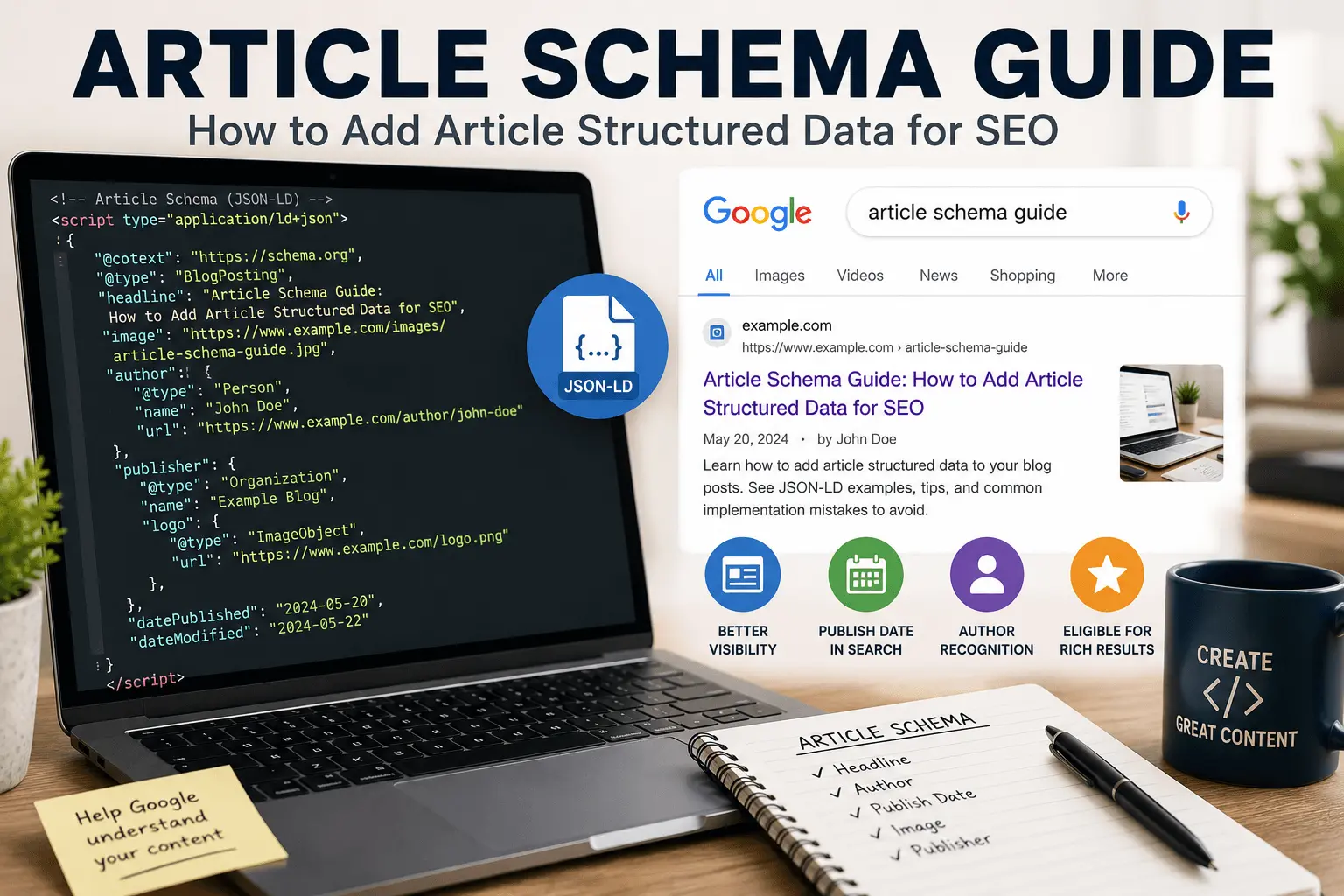
A typical Article schema block looks something like this in JSON-LD:
The headline matches your article title. Not the page title. Not the meta title. The actual article headline. Usually these are the same. Sometimes they're different. The schema should reflect the article's headline specifically.
The author block includes name and optionally a URL. The URL should go to an author page or about page for that person. Not the homepage. Not a random page. Something that establishes who this person is.
The dates use ISO 8601 format with timezone offset. That's the 2026-05-28T09:00:00+00:00 format. The datePublished is when the article first went live. The dateModified is when it was last meaningfully updated. Keep these accurate. If you update an old post, change the dateModified but leave the datePublished alone.
The image should be the featured image for the article. High resolution. At least 1200 pixels wide. Properly formatted. This image can appear in article carousels and related content features.
The publisher block identifies your site as the publisher. The logo should be your site's logo in a square or rectangular format. Google has specific logo requirements if you want it to appear in certain features.
For blog posts, swap the type to BlogPosting:
Everything else stays the same. The properties are identical between Article and BlogPosting.
For news articles, use NewsArticle and add any additional required fields:
The NewsArticle type may require additional properties like articleBody or dateline depending on how you're using it. Check Google's NewsArticle documentation for current requirements.
How to Add Article Schema to Your Website
Most people already have article schema and don't know it.
If you're on WordPress with an SEO plugin like Yoast or RankMath, article schema is added automatically to every post. You don't need to do anything. The plugin generates the JSON-LD with the correct headline, author, dates, and publisher information.
If you're on a different CMS, check whether your theme or platform adds article schema by default. Many do. View your page source. Search for application/ld+json. Look for "@type": "Article" or "@type": "BlogPosting". If you find it, it's already there.
If you're not on WordPress, the setup is usually easier than people expect. Use a schema generator. Our free schema markup generator handles Article, BlogPosting, and NewsArticle types. Fill in the fields. Get the JSON-LD. Paste it into your page header.
The code goes in the <head> section of your article pages. If you're using a CMS, there's usually a way to add header code to specific page templates. WordPress has the header.php file or plugins like Insert Headers and Footers.
If you're publishing a lot of articles, you want this automated. Adding schema manually to each post doesn't scale. Use your CMS or a plugin that generates article schema dynamically based on the post data.
After adding the schema, test it. Google's Rich Results Test tool validates article schema. Paste your URL. Check for errors. Article schema errors are usually straightforward to fix. Missing headline. Invalid date format. Broken image URL. You can also validate your markup using our free rich results tester before publishing. If validation fails, see our common schema errors guide for troubleshooting.
Our how to add schema markup guide covers the implementation process in more detail across different platforms.
Article Schema Workflow
Here's the process from start to finish:
- Write your article with a clear headline and author attribution.
- Generate the schema using our free schema markup generator.
- Add the JSON-LD to your page header.
- Validate with the rich results tester.
- Publish the article.
- Request indexing in Google Search Console.
- Monitor Search Console for errors and rich result performance.
Common Article Schema Mistakes
Most article schema problems come from automation that's slightly wrong.
Missing or incorrect dateModified. If your schema shows the same date for datePublished and dateModified but you've updated the article, that's inaccurate. If you've never updated it, same date is fine.
Wrong headline in schema. The schema headline should match the article headline on the page. If your SEO plugin pulls the headline from the wrong source, it might show the site name or something truncated.
Missing author URL or broken author page link. The author URL in your schema should work. Test it. If it returns a 404, fix it.
Low-resolution or missing image. The image in article schema should be large enough for Google to use in carousels and features. A tiny thumbnail won't work.
Duplicate article schema. Your theme adds one block. Your plugin adds another. Both say Article. Google sees two Article schemas on the same page. Consolidate to one.
Using the wrong schema type for the content. BlogPosting for blog posts is fine. Article for blog posts is also fine. But NewsArticle for blog posts is incorrect and might cause issues if you're not actually a news publisher.
Publisher logo that doesn't meet Google's requirements. The logo in the publisher block should be your actual site logo in a square or rectangular format. It can appear alongside your content in some search features.
Outdated schema after site redesign. Changed your logo? Update the publisher block. Changed your URL structure? Update the author URLs. Schema doesn't update itself when your site changes.
Our free SEO checker scans for schema issues among other technical problems if you want a broader audit.
How to Test Article Schema
The Rich Results Test is the primary tool. It validates article schema and checks for eligibility in article-related search features. Our free rich results tester provides the same validation for quick checks.
Paste your article URL. The tool shows detected schema types. If article schema is found, it shows whether it's valid and whether there are errors or warnings.
Pay attention to warnings even if there are no errors. Warnings sometimes indicate that the schema is technically valid but missing properties that would improve how Google uses it.
Google Search Console's Enhancements section shows article schema detection across your site. Check it a week or two after adding schema. It'll show how many valid article pages you have and any issues Google encountered. If Google doesn't detect your Article schema after implementation, verify that the page can be crawled and indexed using our free indexability checker. Also ensure the article is included in your xml sitemap so Google can discover updated structured data promptly. Our XML sitemap generator helps with that.
For news publishers, there's a dedicated News section in Search Console. It shows whether your NewsArticle schema is working and whether your content is appearing in Google News.
If you're targeting Top Stories, test with the Rich Results Test and check Search Console for any news-specific errors. Top Stories has stricter requirements than general article rich results.
Article Schema for News Publishers
News publishers have additional considerations.
Use the NewsArticle type. Not Article. Not BlogPosting. NewsArticle specifically. Google requires this for Google News inclusion.
Include additional properties that NewsArticle supports but Article doesn't require. Things like the article body text or a dateline indicating where the story was reported from. These aren't always required but they help.
Make sure your dates are precise. News content is highly time-sensitive. The datePublished should be accurate to the minute. The timezone should be correct. If you update a breaking story, update the dateModified to reflect when new information was added.
The publisher information becomes more important for news. Your organization name and logo should be consistent across all articles. If Google recognizes your site as a legitimate news publisher, that recognition helps with News and Top Stories placement.
Submit your site to Google News through the Publisher Center if you haven't already. Article schema alone doesn't guarantee News inclusion. The Publisher Center registration is a separate step.
Our SEO guide for beginners covers foundational SEO that applies to news sites as much as any other.
Does Article Schema Help Rankings
Not directly. Google has repeatedly said structured data is not a direct ranking factor. Article schema doesn't have a direct ranking impact the way some people hope.
What it does is support features that improve visibility. Article carousels appear above regular search results. Top Stories placement puts your content in a dedicated news section. Proper date display helps people choose recent content over older alternatives.
These features improve click-through rates. Better CTR at the same ranking position means more traffic. Sustained better CTR might influence rankings indirectly over time. But the schema itself isn't a ranking factor.
For most blogs, the main benefit of article schema is proper date display in search results and correct attribution of your content. Not flashy. But useful.
For news publishers, article schema is essential. Without it, Google News and Top Stories are off the table. That's a significant traffic channel for news content.
How Article Schema Fits Into Blog SEO
Article schema is one piece of blog post optimization. One of the simpler pieces.
You still need good content that matches search intent. You still need proper title tags and meta descriptions. Our meta tag checker helps verify those are set up correctly.
You still need internal links connecting your articles to each other. Our internal linking checklist covers that side of things.
You still need a technically sound site. Clean sitemaps. No crawl errors. Fast loading times. Our blog post SEO checklist covers the full optimization stack.
You still need proper author pages with real bios. Article schema references authors. Google pays attention to who writes what. An author URL that points to a generic page or a 404 weakens the signal. A proper author page with credentials and expertise strengthens E-E-A-T signals that article schema helps establish.
Article schema works in the background. It doesn't replace any of those other things. It adds a layer of structured understanding that helps Google process your content correctly. It's low effort and low risk. The kind of SEO task worth doing and then forgetting about.
Should You Add Article Schema to Old Posts
Yes. If your old posts don't have article schema, adding it is worth the minimal effort.
Most platforms add article schema to all posts automatically once it's configured. If you're using WordPress and install an SEO plugin today, it'll add article schema to every post including old ones. You don't need to update each post individually.
If you're adding schema manually, prioritize your most important and most trafficked posts first. Then new posts going forward. Then old posts if you have the time.
The benefit is incremental. Old posts that already rank might show dates more accurately. They might become eligible for article features they weren't eligible for before. The impact is subtle. But the effort is small enough that it's usually worth doing.
Related Resources
Learn more about structured data and blog SEO:
- What Is Schema Markup?
- How to Add Schema Markup
- JSON-LD vs Microdata
- Common Schema Errors
- Schema Markup Checklist
- Blog Post SEO Checklist
- SEO Content Writing Guide
Article schema is a background player in SEO. It doesn't produce the visible rich results that product or recipe schema generates. But it does important structural work that helps Google understand your content correctly.
Most sites already have it through their platform or plugins. If you're on WordPress with any decent SEO plugin, article schema is probably already working. Check your page source to confirm. Test a few URLs with the Rich Results Test. Fix errors if you find them.
If you're not on WordPress, adding article schema is straightforward. Use a generator. Paste the code. Test it. Automate it if you publish regularly. The whole process takes maybe ten minutes to set up and almost no ongoing maintenance.
News publishers should pay more attention. The NewsArticle type has stricter requirements, and the stakes are higher if it's wrong. Top Stories traffic depends on getting this right.
For everyone else, article schema is a set-it-and-forget-it optimization. Add it once. Confirm it's working. Focus your energy on content quality and other SEO fundamentals that move the needle more directly.
It won't transform your rankings overnight. But it will make sure Google understands exactly what you published, when you published it, and who wrote it. That's worth ten minutes of your time.